Quick start
- A launch is a new token sold on a price curve for a real tokenized stock, such as NVDA or TSLA.
- Buying gets you the token. Every buy pushes the price up; every sell pulls it down.
- Graduation happens when 79.31% of the tokens are sold, at about $8,205 raised. The token moves to a locked trading pool.
- The treasury receives 30% of the money raised, holds the stock and trades it by the rule the creator picked.
- What the treasury earns buys the token back and burns it. Holders have no claim on the treasury itself (none today; one may be added later).
- Every trade pays a 1% to 15% tax (the launcher decides), in stock; after graduation, a 0.20% pool fee on top, which goes to the treasury's buy-back budget. A launch costs 0.0005 ETH.
Hedgefun v2 is live on Robinhood Chain mainnet at hedgefun.trade, and anyone can launch. The screenshots come from the testnet front end on chain 46630, where the test stocks have no value; the live form may differ in detail. The address book lists the mainnet contracts.
Launch a token
You need a wallet on Robinhood Chain with 0.0005 ETH plus gas. The example stock trades at $200. The form has four steps.
-
Basics. Enter a name and a symbol, add a logo if you have one, and pick the stock the treasury will trade. Write a short description and add at least one link (X, Telegram, Discord or a website); both are stored on chain with the token.
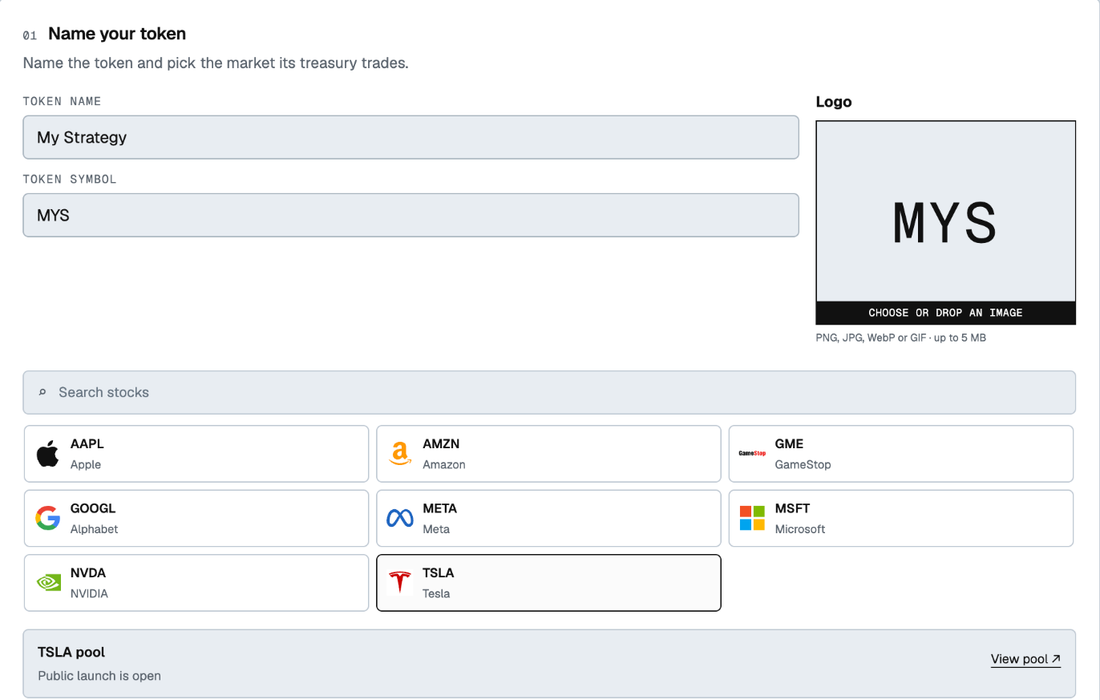 Step 1: name the token and pick the stock.
 -
Fund. Pick one of seven fund types: Lot fund, Lot fund · opening reserve, Lot fund · 10% buy-back, Cycle, Rebalance, Rebalance · fixed amounts, or Buy-back only. The type is fixed at launch. Keep the Quick start numbers, or choose Build your own to change them.
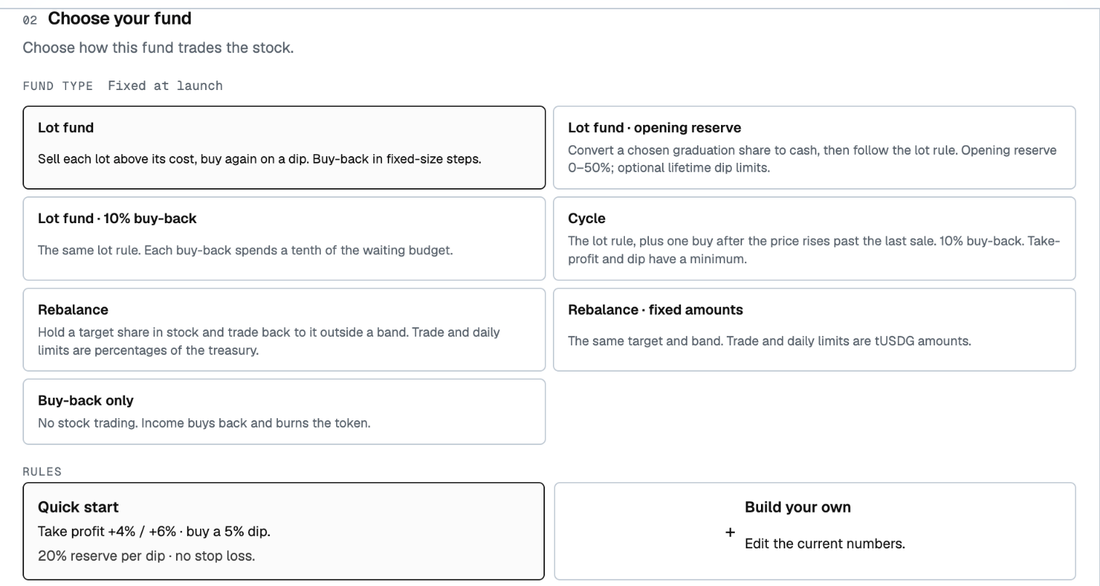 Step 2: the seven fund types and the rules.
Below the choice, the page lists the risks of your settings, shows in pictures what the rules do, and replays them on the stock's past prices: how much the treasury would have bought back, how many trades it would have made, and how the other fund types compare.
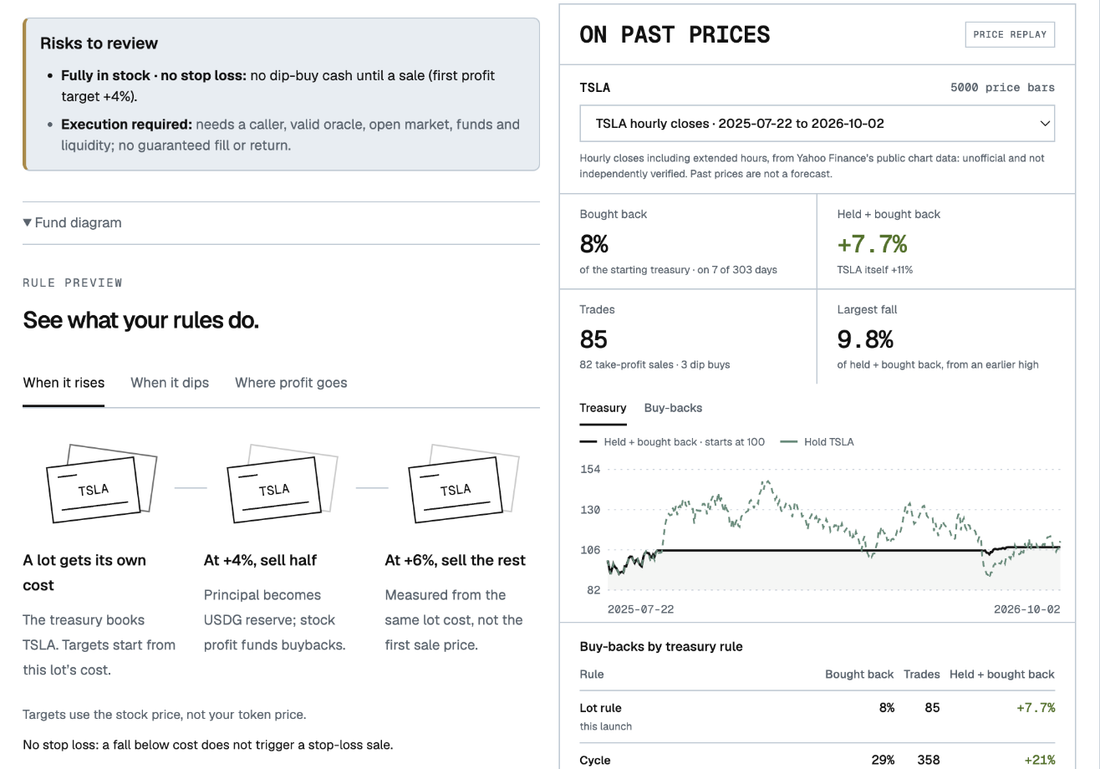 Step 2: the rule preview and the replay on past prices. Past prices are not a forecast.
Builder, the easy path. Open the Builder tab, pick the stock, and add one rule for when the stock rises and one for when it falls; the fees always flow to the buy-back. The page shows the exact terms the launch will freeze and, for the rules that have a model, how they would have done on that stock's past prices. "Use this strategy" fills the launch form, and you can still change any number before launching. One-click presets named by what they do ("Take profit and buy the dip" for Lots, "Burn with every fee" for Buy-back, "Keep half in stock" for Spot, "Rebalance in small steps" for Rebalance, "Burn a tenth at a time" for Percentage buy-back, "Sell the rise, buy back in" for Cycle) are in the next front-end release.
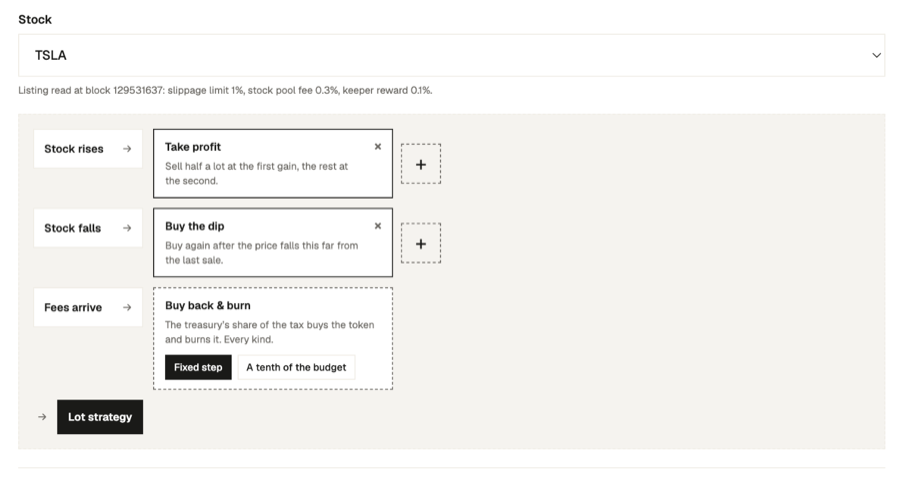 Testnet front end: composing a Lots strategy in Builder.
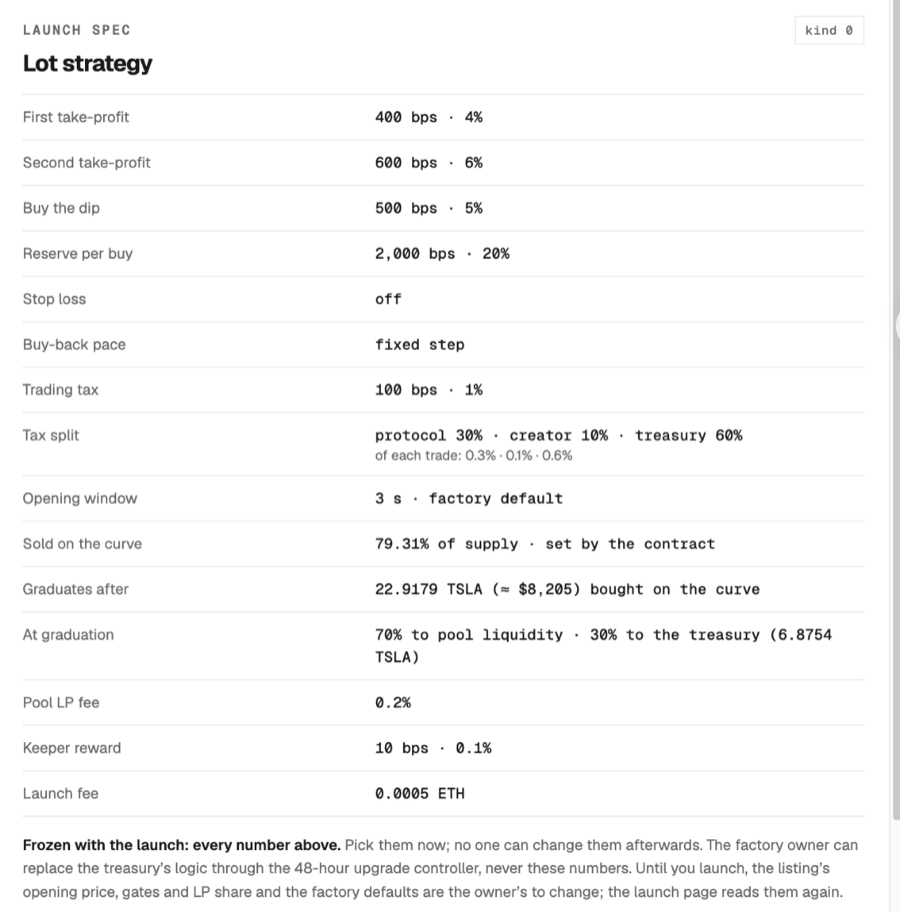 Testnet front end: the terms Builder will freeze at launch.
 -
Settings. Set the trading tax, 1% to 15%, which funds the treasury and the protocol. Add a creator tax on top if you want one: it is yours, at most equal to the trading tax, and the two together are at most 15%. On a $1,000 trade with a 1% trading tax and a 1% creator tax, buyers pay $20 and you receive $10. The opening window is 3 seconds unless you change it (0 to 180 seconds); inside it, buyers pay a premium that falls from 99% to the tax. Up to 40 wallets you list skip that premium, and your own wallet always does.
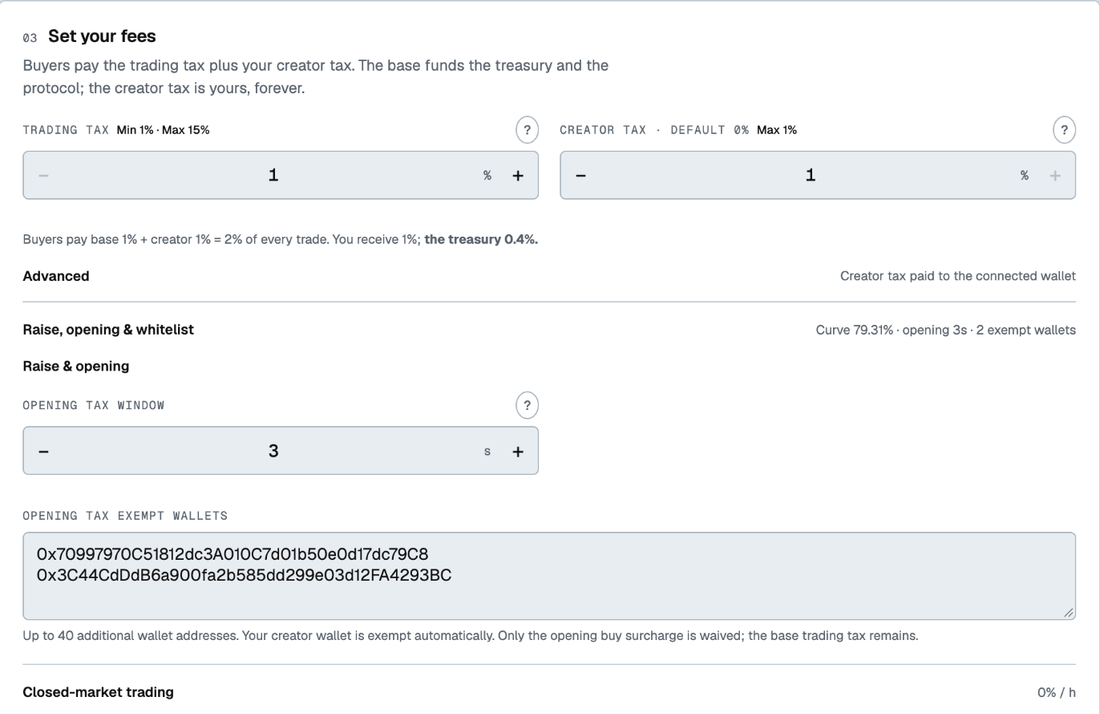 Step 3: the taxes, the opening window and the exempt wallets.
 -
Confirm & launch. Check the summary: the 0.0005 ETH fee, the fund type and its numbers, the tax split, what it takes to graduate, the 70/30 split at graduation, and the market cap at opening and at graduation. Add a dev buy in the stock if you want one; it is confirmed separately after the launch, and your own buy skips the opening premium. Press Launch V2 Fund and confirm the setup, approval and launch transactions in your wallet. The token page opens at 0% sold.
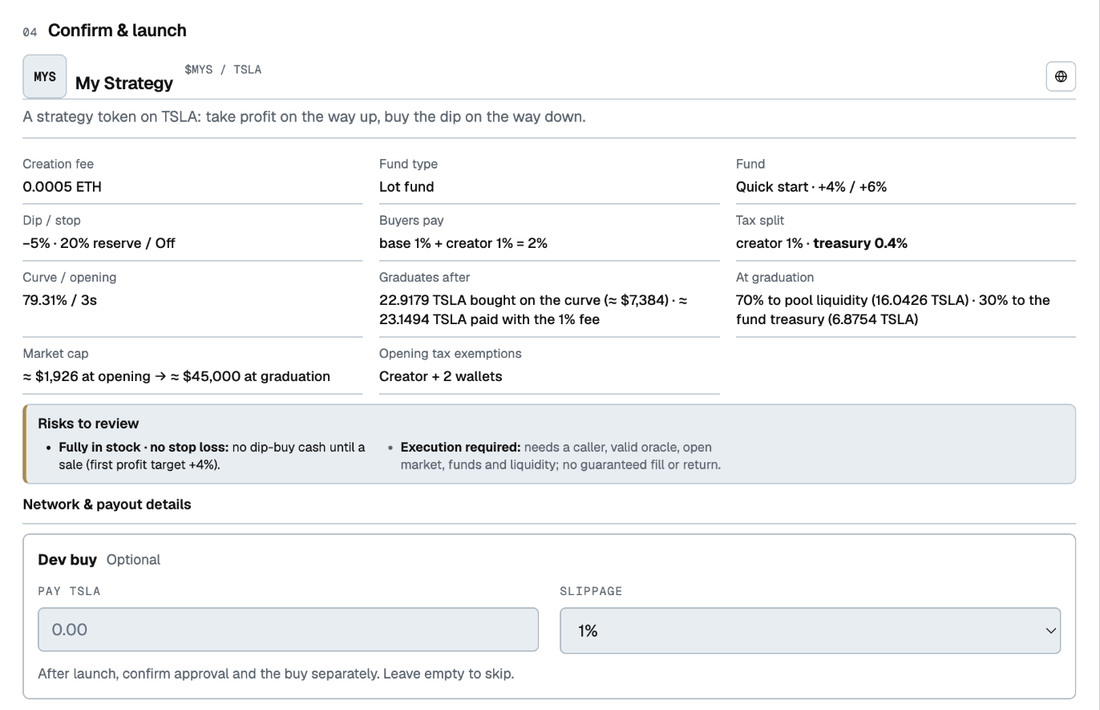 Step 4: the review before signing. Nothing was launched for this screenshot.
 -
Share the page. From the first trade on, your creator tax arrives in your wallet as stock.
The raise and the opening valuation are fixed for each stock, in the stock, when it is listed. The review shows them at today's price.
Buy a token
You need a wallet on Robinhood Chain holding the stock, USDG or ETH.
-
Open a token page. Pick a token on the Funds page, or search by name, ticker or address. A token on the curve shows a progress bar toward 79.31%; a graduated one shows its pool price.
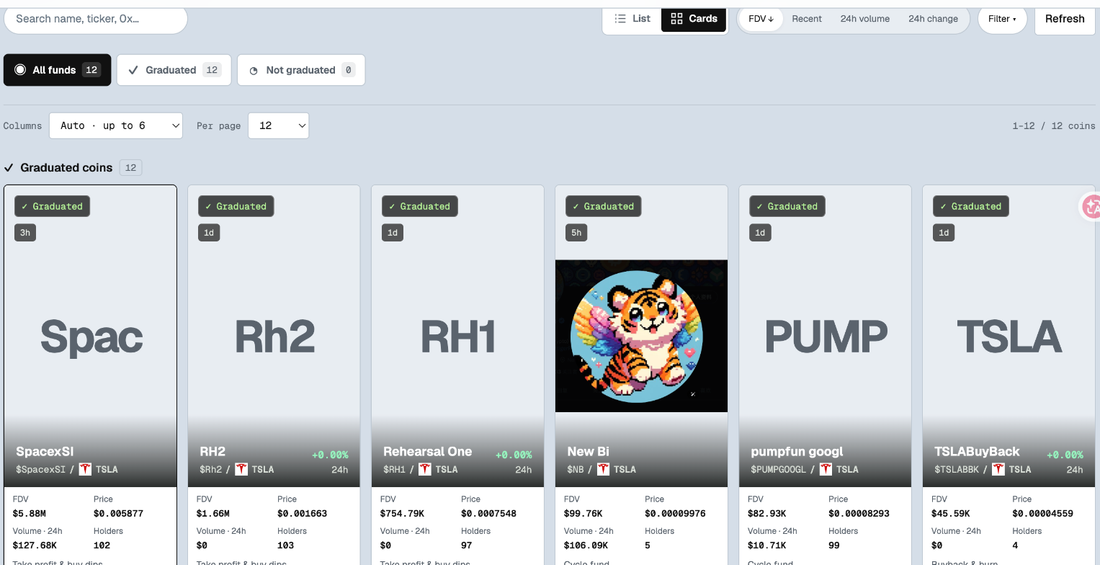 The Funds page.
 -
Read the strategy. The page shows which strategy the treasury runs and whether it can trade the stock right now.
-
Enter an amount. The quote shows the tokens you get, the tax, any opening premium, and the 0.20% pool fee after graduation. Paying in USDG or ETH converts to the stock first; any unused amount comes back as stock.
-
Set a minimum and sign. Your wallet shows an approval and the trade. Your balance appears on the page.
-
Watch for graduation. When the curve reaches 79.31% sold, the page switches to "Graduated". The price carries over, about 23 times the opening price.
-
Sell when you want. Before graduation you sell to the curve. After graduation you sell in the pool. Both charge the same tax.
What you pay
| when | what | on the $200 stock |
|---|---|---|
| launching | 0.0005 ETH | |
| every buy and sell | the trading tax (1% to 15%) plus any creator tax, at most 15% together, in stock | $30 on a $1,000 trade at 3% |
| buys in the opening window | a premium, burned from your tokens | 99% at the first second, falling to the tax |
| pool trades after graduation | 0.20% pool fee, to the treasury's buy-back budget | about $2 on a $1,000 trade |
Related
- How it works: the curve, graduation and each strategy, in pictures.
- Questions first-time buyers ask.
- Who does what: what each party pays and receives.
- Protocol and integration: the contracts.